
SN
moderator-only


 Keep your Community clean from spam with new AutoMod spam filters
We know dealing with spammy messages sucks. If only there was a way spammy messages could be blocked from being posted in your channels and threads in the first place…
Thankfully, every community’s best friend in moderation - AutoMod - just got buffed with some new spam-cleansing abilities. Enable AutoMod in Server Settings > AutoMod to save hours of moderation work with these new filters:
Keep your Community clean from spam with new AutoMod spam filters
We know dealing with spammy messages sucks. If only there was a way spammy messages could be blocked from being posted in your channels and threads in the first place…
Thankfully, every community’s best friend in moderation - AutoMod - just got buffed with some new spam-cleansing abilities. Enable AutoMod in Server Settings > AutoMod to save hours of moderation work with these new filters:
 Block Mention Spam - Detect and block mention spam and mention raids before they happen to keep chat clean and prevent members in your community from receiving annoying mention notifications and ghost pings. Set your own limit on the number of mentions a message may contain (up to 50).
Block Spam Content - Detect and block messages containing text content that has been widely flagged as spam by user reports. Great for blocking unwanted spam like those pesky free Nitro scams, unsolicited advertisements, and invite spam that disrupt your Community's friendly conversations and game nights.
Check out our updated AutoMod FAQ help article: https://support.discord.com/hc/en-us/articles/4421269296535-AutoMod-FAQ
Our early plans and progress to protect communities from raids
We know being raided is one of the worst experiences you and your Community can go through which is why we’re giving you a heads up that we’re exploring ways to better detect and prevent raids before they take place, while making it easier to de-escalate a raid when they do happen.
While we’re in the earlier stages of progress here at Discord Labs™, rest assured we’re eager to equip you with effective tools to more easily deal with raids as quickly as we can. So what can you do now?
Report Raids: You can now directly send us feedback reports when a raid is taking place in your server by going to your Server Dropdown and selecting Report Raid. If your Community is being raided, we encourage you to partner with us in our moderation efforts by reporting the situation as we’ll be regularly reviewing your raid reports to develop tooling that combat raids.
Pause invitations to your Community at anytime - You can now pause your invite links for when you want to temporarily prevent people from joining your server without having to revoking your invite links or vanity URLs - just head over to Server Settings > Invites.
Because this cuts off the flow of new arrivals, you'll have an easier time halting a raid in progress. It also lets well-intentioned community members trying to join know that the stoppage is temporary, and that soon, they’ll be able to come back to the same link and try again.
Learn more about pausing invites: https://support.discord.com/hc/en-us/articles/8458903738647
How we’re protecting communities from suspicious links:
To help y’all with the legwork in dealing with messages containing malicious links, we’ve buffed every Community server with a proactive suspicious link filter designed to detect and block messages containing links that are verified to be harmful, such as those leading to malware or phishing sites that try to steal people’s personal or financial information. We’ll be continuously working on identifying links that might mislead or redirect users by reviewing a regularly updated list of unsafe and phishing websites: https://support.discord.com/hc/en-us/articles/7326747355159-Why-was-my-message-not-delivered-
Block Mention Spam - Detect and block mention spam and mention raids before they happen to keep chat clean and prevent members in your community from receiving annoying mention notifications and ghost pings. Set your own limit on the number of mentions a message may contain (up to 50).
Block Spam Content - Detect and block messages containing text content that has been widely flagged as spam by user reports. Great for blocking unwanted spam like those pesky free Nitro scams, unsolicited advertisements, and invite spam that disrupt your Community's friendly conversations and game nights.
Check out our updated AutoMod FAQ help article: https://support.discord.com/hc/en-us/articles/4421269296535-AutoMod-FAQ
Our early plans and progress to protect communities from raids
We know being raided is one of the worst experiences you and your Community can go through which is why we’re giving you a heads up that we’re exploring ways to better detect and prevent raids before they take place, while making it easier to de-escalate a raid when they do happen.
While we’re in the earlier stages of progress here at Discord Labs™, rest assured we’re eager to equip you with effective tools to more easily deal with raids as quickly as we can. So what can you do now?
Report Raids: You can now directly send us feedback reports when a raid is taking place in your server by going to your Server Dropdown and selecting Report Raid. If your Community is being raided, we encourage you to partner with us in our moderation efforts by reporting the situation as we’ll be regularly reviewing your raid reports to develop tooling that combat raids.
Pause invitations to your Community at anytime - You can now pause your invite links for when you want to temporarily prevent people from joining your server without having to revoking your invite links or vanity URLs - just head over to Server Settings > Invites.
Because this cuts off the flow of new arrivals, you'll have an easier time halting a raid in progress. It also lets well-intentioned community members trying to join know that the stoppage is temporary, and that soon, they’ll be able to come back to the same link and try again.
Learn more about pausing invites: https://support.discord.com/hc/en-us/articles/8458903738647
How we’re protecting communities from suspicious links:
To help y’all with the legwork in dealing with messages containing malicious links, we’ve buffed every Community server with a proactive suspicious link filter designed to detect and block messages containing links that are verified to be harmful, such as those leading to malware or phishing sites that try to steal people’s personal or financial information. We’ll be continuously working on identifying links that might mislead or redirect users by reviewing a regularly updated list of unsafe and phishing websites: https://support.discord.com/hc/en-us/articles/7326747355159-Why-was-my-message-not-delivered-
 )
Want to do a bit more deep thonking and research around how to best use Forum Channels before diving in? The following article on our Community Resources site will guide you on your journey to reaching forum Valhalla: https://discord.com/community/creating-value-with-conversation
https://www.youtube.com/watch?v=y4MxuHNIIg0
)
Want to do a bit more deep thonking and research around how to best use Forum Channels before diving in? The following article on our Community Resources site will guide you on your journey to reaching forum Valhalla: https://discord.com/community/creating-value-with-conversation
https://www.youtube.com/watch?v=y4MxuHNIIg0
 Server Subscriptions available in the US!
Customize tiers, offer exclusive paid content, and meet future subscribers with Promo Pages—all while providing as much of a free experience to your community as you want. (https://dis.gd/CUServerSubs)
Server Subscriptions are only available in the US. Join our waitlist to be notified if they're available in your area. (https://dis.gd/ServerSubsWaitlist)
Server Subscriptions available in the US!
Customize tiers, offer exclusive paid content, and meet future subscribers with Promo Pages—all while providing as much of a free experience to your community as you want. (https://dis.gd/CUServerSubs)
Server Subscriptions are only available in the US. Join our waitlist to be notified if they're available in your area. (https://dis.gd/ServerSubsWaitlist)
 Private Threads are now available to all!
Your community no longer needs to have Server Boosting to Level 2 to use Private Threads.
Private Threads are now available to all!
Your community no longer needs to have Server Boosting to Level 2 to use Private Threads.
 Improvements to Server Insights!
Dates should be more accurate.
Conversations in Forum Channels will contribute to Engagement metrics, and now you can see joins via Student Hubs, Integrations, and Bots.
The requirement to be a Communicator has been increased from 1 to 3 messages sent per week. This only applies to the Engagement tab and doesn’t impact Partner requirements.
Improvements to Server Insights!
Dates should be more accurate.
Conversations in Forum Channels will contribute to Engagement metrics, and now you can see joins via Student Hubs, Integrations, and Bots.
The requirement to be a Communicator has been increased from 1 to 3 messages sent per week. This only applies to the Engagement tab and doesn’t impact Partner requirements.
 Forum Channels now with Gallery View!
Gallery View gives posts in image-heavy Forum Channels like #fanart and #pet-pics room to shine - easily toggle between List View and Gallery View at any time.
With this update, Forum Channels are now officially available on all Community servers!
Forum Channels now with Gallery View!
Gallery View gives posts in image-heavy Forum Channels like #fanart and #pet-pics room to shine - easily toggle between List View and Gallery View at any time.
With this update, Forum Channels are now officially available on all Community servers!
 AutoMod keeps getting better!
Alongside more Custom Rules, we’ve added Allowlists to your custom rules! Messages containing anything you’ve added to your Allowlist will not be flagged by AutoMod.
We’ve also added the ability to filter messages using RegEX in your custom rules. (https://dis.gd/RegEXHC)
Enjoy your new tools, everyone! (edited)
AutoMod keeps getting better!
Alongside more Custom Rules, we’ve added Allowlists to your custom rules! Messages containing anything you’ve added to your Allowlist will not be flagged by AutoMod.
We’ve also added the ability to filter messages using RegEX in your custom rules. (https://dis.gd/RegEXHC)
Enjoy your new tools, everyone! (edited)


 We wanted to make it easier for you to identify and add your friends while preserving your ability to use your preferred name across Discord. So, we are removing discriminators and introducing new, unique usernames and display names.
 New usernames are lowercase, alphanumeric, limited to certain special characters, and do not have discriminators, making them easier to remember, read, type, and share. Now, rather than having to remember “PhiBi#8936,” you just say “I'm phibiscool” and that’s it. Your new username will be unique to you, and when friends try to add you there won’t be any mistakes of the wrong discriminator or incorrect letter casing.
Display names are what’s shown both to your friends and in communities. Think of them as server nicknames that work globally across Discord. You can change it whenever you want, and it can be whatever you want, including special characters, as long as it follows our Community Guidelines https://discord.com/guidelines. If a username you were eyeing gets taken before you can claim it, no worries — you can still use it as a display name.
New usernames are lowercase, alphanumeric, limited to certain special characters, and do not have discriminators, making them easier to remember, read, type, and share. Now, rather than having to remember “PhiBi#8936,” you just say “I'm phibiscool” and that’s it. Your new username will be unique to you, and when friends try to add you there won’t be any mistakes of the wrong discriminator or incorrect letter casing.
Display names are what’s shown both to your friends and in communities. Think of them as server nicknames that work globally across Discord. You can change it whenever you want, and it can be whatever you want, including special characters, as long as it follows our Community Guidelines https://discord.com/guidelines. If a username you were eyeing gets taken before you can claim it, no worries — you can still use it as a display name.
 When you’re eligible to change your old username and claim a new username, you’ll be notified in-app. The older your Discord account, the sooner you will become eligible to pick a new username.
Visit our blog https://discord.com/blog/usernames to hear from one of our founders about why usernames are changing. To learn more about usernames and display names, check out our Help Center Article https://dis.gd/usernames for all the details.
When you’re eligible to change your old username and claim a new username, you’ll be notified in-app. The older your Discord account, the sooner you will become eligible to pick a new username.
Visit our blog https://discord.com/blog/usernames to hear from one of our founders about why usernames are changing. To learn more about usernames and display names, check out our Help Center Article https://dis.gd/usernames for all the details. Friend Server
s are invite-only spaces designed to discuss, connect, and share with your friends or smaller groups. Invite links in Friend servers will expire at a maximum of 30 days, though previously created non-expiring links will remain active and functional.
Friend Servers who wish to have access to Community features https://support.discord.com/hc/en-us/articles/360047132851-Enabling-Your-Community-Server may opt-in to become a Community Server at any time in server settings.
Community Server
Community Servers are spaces designed for people to share, connect, and learn from others all over the world who share common interests. Moderators in Community Servers have access to tools like Server Insights, Raid Protection, Rules, and Onboarding.
Becoming a Community Server does not mean that anyone can find or join your server. Prospective members have to be sent an invite link.
Updating Server Badging
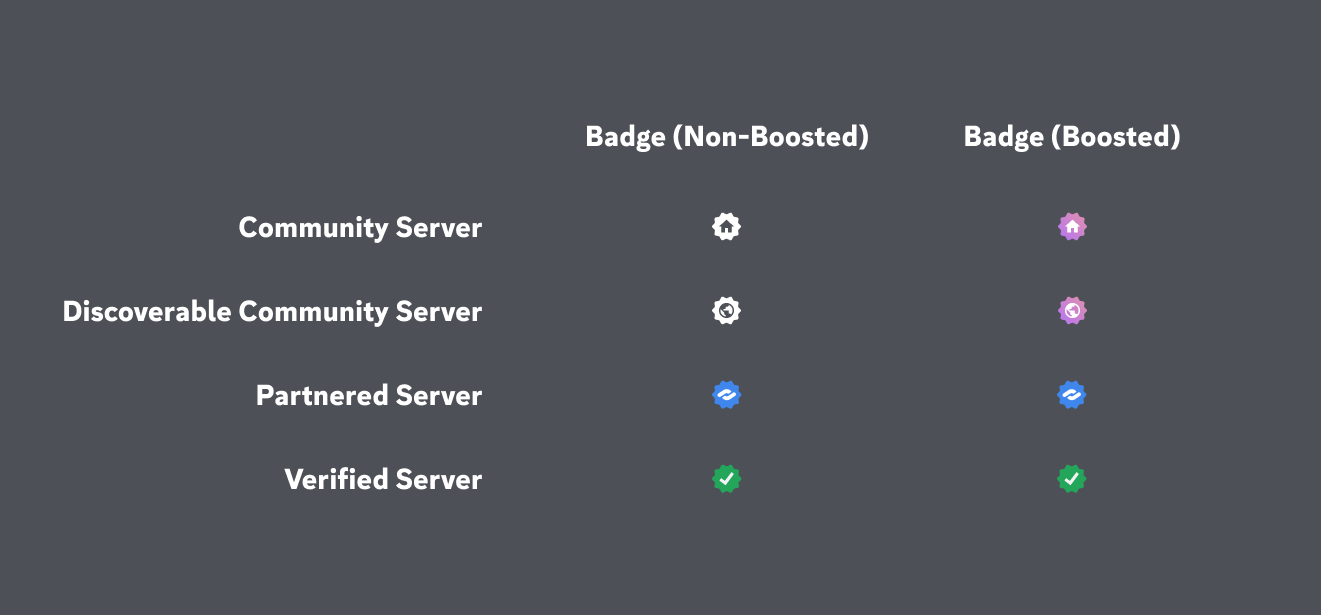
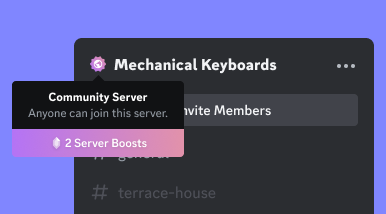
In order for users to know what type of server they’re in, we’ve introduced badges for Community Servers.
We will display a distinct server badge if the server is a
Friend Server
Friend Servers are invite-only spaces designed to discuss, connect, and share with your friends or smaller groups. Invite links in Friend servers will expire at a maximum of 30 days, though previously created non-expiring links will remain active and functional.
Friend Servers who wish to have access to Community features https://support.discord.com/hc/en-us/articles/360047132851-Enabling-Your-Community-Server may opt-in to become a Community Server at any time in server settings.
Community Server
Community Servers are spaces designed for people to share, connect, and learn from others all over the world who share common interests. Moderators in Community Servers have access to tools like Server Insights, Raid Protection, Rules, and Onboarding.
Becoming a Community Server does not mean that anyone can find or join your server. Prospective members have to be sent an invite link.
Updating Server Badging
In order for users to know what type of server they’re in, we’ve introduced badges for Community Servers.
We will display a distinct server badge if the server is a


 Here are some of the features in the Server Guide that might boost your member activity.
 Welcome Sign: A custom message from you to new members, placed at the top.
 New Member To Do's 3-5 next steps for new members that get them talking and participating in your community.
Resources: Declutter your server by turning read-only channels into fancy, easy-to-digest pages with images you upload (so make sure to upload an image) Another perk: Members land at the top of these Resource pages instead of the bottom of a message thread, and message bars and avatars are removed so it looks cleaner. Otherwise, your content, embeds, media, and formatting stay the same.
New Member To Do's 3-5 next steps for new members that get them talking and participating in your community.
Resources: Declutter your server by turning read-only channels into fancy, easy-to-digest pages with images you upload (so make sure to upload an image) Another perk: Members land at the top of these Resource pages instead of the bottom of a message thread, and message bars and avatars are removed so it looks cleaner. Otherwise, your content, embeds, media, and formatting stay the same.
 Automod for Profiles
Sometimes bad actors set their display names in a way that breaks the rules. Automod will allow you to block specific language in a member's profile, preventing them from interacting with others in your community until they update their profile.
Automod for Profiles
Sometimes bad actors set their display names in a way that breaks the rules. Automod will allow you to block specific language in a member's profile, preventing them from interacting with others in your community until they update their profile.
 Remove Reactions by Emoji
Instead of removing all reactions from a post or individually deleting them, you can select the emojis you want to remove. (edited)
Remove Reactions by Emoji
Instead of removing all reactions from a post or individually deleting them, you can select the emojis you want to remove. (edited)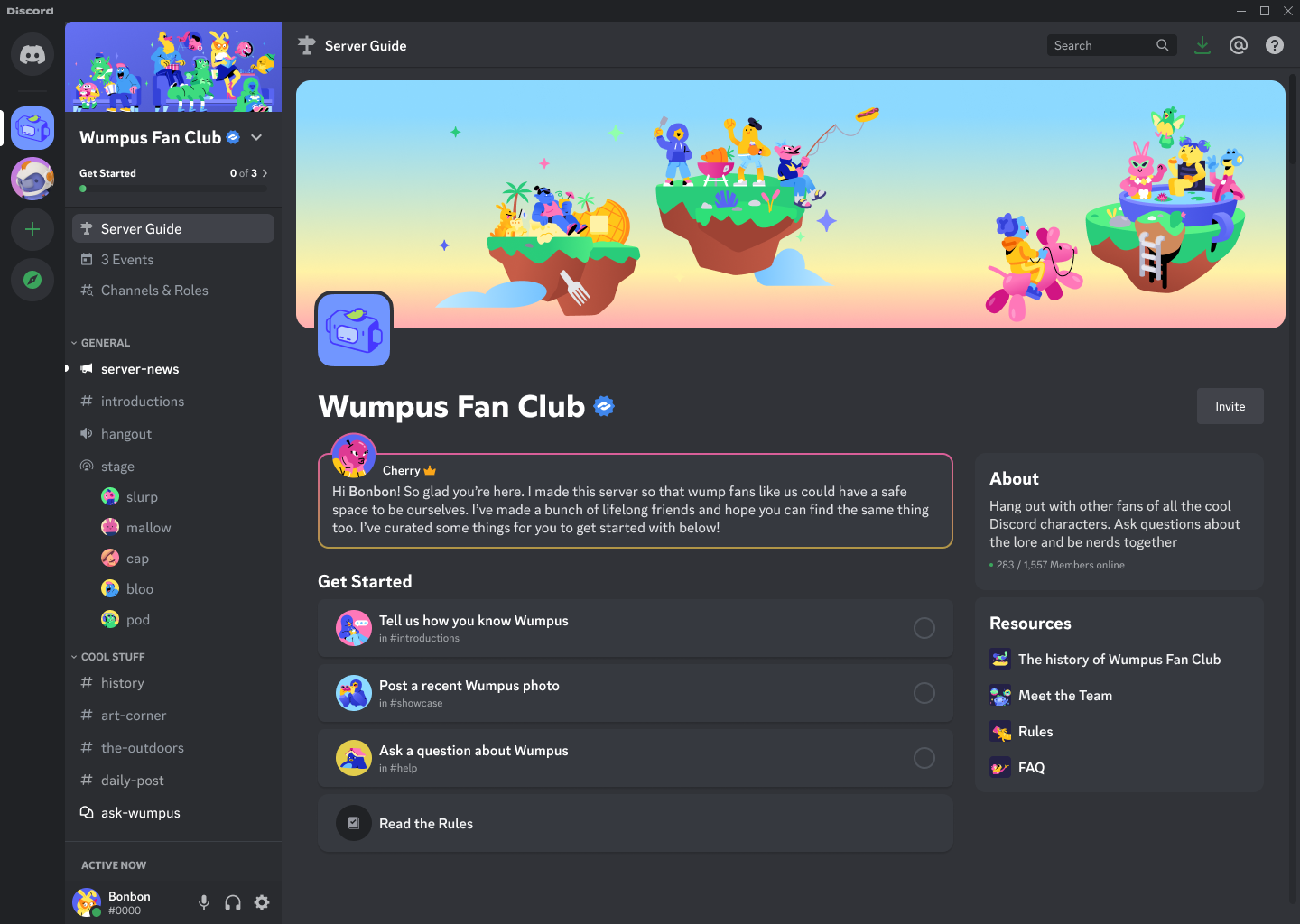

 What's that tag? Guild Tags
See a cute little tag next to a member's username or profile? That's a Guild Tag, which indicates someone's membership to a chosen Guild. You can click on this tag to see the Guild profile, and even apply for membership there as well. What this means for you, beloved Admins and Mods, is that if your server's AutoMod is on, it will also check for Guild Tags
What's that tag? Guild Tags
See a cute little tag next to a member's username or profile? That's a Guild Tag, which indicates someone's membership to a chosen Guild. You can click on this tag to see the Guild profile, and even apply for membership there as well. What this means for you, beloved Admins and Mods, is that if your server's AutoMod is on, it will also check for Guild Tags  What's a Guild? It's a small, exclusive server that members can apply to join. These servers are tight-knit communities where members can relish in shared identities, hobbies, play styles, and more!
 More Apps in More Places